# Add additional data to boarding applications
> Learn how `additionalData` works in boarding applications
The `additionalData` object is a flexible extension point in Payabli's boarding APIs that allows you to pass custom key-value pairs associated with the application, business, owners, or signers. This flexibility is useful for enriching the application context or aligning with your existing systems.
To use `additionalData` fields, your boarding templates must be updated to include `additionalData`. Contact your Payabli solutions engineer to update your boarding templates.
## Common use cases
Here are some common scenarios where `additionalData` is useful:
* Add business-level `additionalData` to indicate how long you've worked with the merchant. Payabli uses this data to inform custom underwriting policies.
* Include a unique user ID in the owner's `additionalData` to streamline post-boarding user provisioning in their portal.
* Supply historical risk scores and account balance information in `additionalData` to inform your own underwriting decisions while leveraging Payabli for orchestration.
Don't transmit sensitive data like credit scores, Social Security Numbers, or birthdates in `additionalData`. These fields aren't intended for storing Personally Identifiable Information (PII) or regulated data.
## Best practices
Keep these best practices in mind when using `additionalData` with boarding operations:
* Avoid transmitting unstructured or nested data. Stick to flat key-value pairs.
* Keep keys predictable and consistent across environments and integrations.
* Don't use `additionalData` as a substitute for core schema fields like legal name or Social Security Number.
* If a field is critical for compliance or reconciliation, consider formalizing it in your integration rather than relying on `additionalData`.
## Where `additionalData` is available
You can add the `additionalData` object to three main objects in the boarding template to be captured on boarding applications:
* **Root business level**: Fields that apply to the business entity
* **Owners**: Fields associated with each beneficial owner
* **Signers**: Fields associated with individuals signing on behalf of the business
This allows precise scoping of data depending on the entity to which it pertains.
## Adding `additionalData` to templates
To update your templates to include `additionalData`, contact your Payabli solutions engineer.
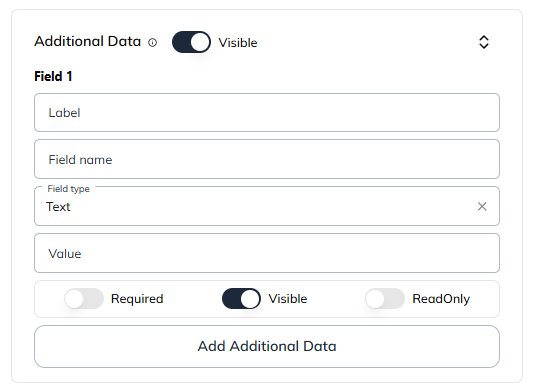
Boarding templates are essential for defining how services, pricing, and dynamic fields (including `additionalData`) are presented during boarding. To make sure that your `additionalData` fields are rendered in boarding applications, you must first declare them in your boarding templates.
 ```json Example of additionalData in a boarding template
"additionalData": {
"visible": true,
"fields": {
"HQ-Location": {
"label": "Where is your headquarters located?",
"type": "text",
"options": null,
"posRow": 0,
"posCol": 0,
"value": "",
"visible": true,
"readOnly": false,
"required": true
},
"ERP Usage": {
"label": "Do you use an accounting system (e.g., QuickBooks, Xero)?",
"type": "boolean",
"options": null,
"posRow": 0,
"posCol": 0,
"value": "",
"visible": true,
"readOnly": false,
"required": true
},
"adBudget": {
"label": "How much do you spend each month advertising your services?",
"type": "number",
"options": null,
"posRow": 0,
"posCol": 0,
"value": "",
"visible": true,
"readOnly": false,
"required": false
},
"referralSource": {
"label": "How did you hear about us?",
"type": "dropdown",
"options": [
{"label": "Search engine", "value": "search"},
{"label": "Referral", "value": "referral"},
{"label": "Social media", "value": "social"}
],
"value": "",
"visible": true,
"readOnly": false,
"required": true
},
"session_id": { // Prefilled field for tracking session. Notice that it includes a value and is not visible to the user.
"label": "Session ID",
"type": "text",
"options": null,
"posRow": 0,
"posCol": 0,
"value": "sesh-21dh2-jf4493-f34h4f8-2323",
"visible": false,
"readOnly": false,
"required": false
},
"partnerScore": { // Prefilled field for custom risk score. Notice that it includes a value and is not visible to the user.
"label": "Partner Risk Score",
"type": "dropdown",
"options": [
{"label": "Low Risk", "value": "low-risk"},
{"label": "Medium Risk", "value": "medium-risk"},
{"label": "High Risk", "value": "high-risk"}
],
"posRow": 0,
"posCol": 0,
"value": "low-risk",
"visible": false,
"readOnly": false,
"required": false
}
}
```
The next section describes the configuration options available for each `additionalData` field in your boarding templates.
### Field configuration options
Each `additionalData` object on a boarding template has these parameters:
| Setting | Type | Description | Example |
| ---------- | ------------------------------------ | ---------------------------------------------------------------------------------------------------------------------------------------------------------------------------------------------------------------- | ------------------------------------------------------------------------------------------------ |
| `key` | string | The field's name. Each field in the `additionalData` object uses a custom field name as its key. The field name is the key in the API payload. | `referralSource` |
| `label` | string | The field's label displayed to the user. | "How did you hear about us?" |
| `type` | string | Input type presented to the user. Supported values: `text`, `number`, `boolean`, `dropdown`, `multiselect` | `"text"` |
| `value` | string \| number \| boolean \| array | The value to be prefilled or submitted for the field. For `multiselect` fields, this should be an array. | `"search engine"` |
| `options` | array \| null | For `dropdown` and `multiselect` fields, an array of selectable options. Each option is an object with `label` and `value` properties. For other field types, this should be `null`. | `[{"label": "Search engine", "value": "search engine"}, {"label": "Friend", "value": "friend"}]` |
| `posRow` | integer | The row position of the field in the form layout. | `0` |
| `posCol` | integer | The column position of the field in the form layout. | `0` |
| `visible` | boolean | When `true`, the field appears on the application form. Setting this field to `false` hides the field from the applicant, but allows you to pass system-generated or other pre-filled data with the application. | `true` |
| `readOnly` | boolean | When `true`, the field is read-only and not editable by the applicant. | `true` |
| `required` | boolean | When `true`, the field is required and must be filled out to submit the application. When `false`, the field is optional. | `false` |
## Field types
| Field type | Description |
| ------------- | ------------------------------------------------------------------ |
| `text` | User can enter a string of alphanumeric text as a response |
| `number` | User can enter a float number |
| `boolean` | User can enter true or false selections |
| `dropdown` | User can select a single answer from a predefined list of options |
| `multiselect` | User can select multiple answers from a predefined list of options |
These settings let you customize boarding flows based on operational or compliance requirements while creating a user-friendly experience.
## Passing `additionalData` on applications
When using the [POST /Boarding/app](/developers/api-reference/boarding/create-boarding-application) endpoint, you can pre-populate `additionalData` to streamline the user experience and enrich the application context.
Here is an example of how to pass `additionalData` at the business level:
```json
"additionalData": {
"referralSource": "search", // Custom field for tracking referral source
"session_id": "sesh-21dh2-jf4493-f34h4f8-2323", // Correlates session data
"partnerScore": "low-risk" // Custom risk signal
}
```
This data is visible in the Payabli dashboard under the "Additional Data" section of the application or paypoint's record, and you can also retrieve it via the API by calling any of the GET boarding app endpoints, such as [GET /Boarding/read/:appId](/developers/api-reference/boarding/get-boarding-application-by-id).
## Related resources
See these related resources to help you get the most out of Payabli.
* **[Boarding statuses reference](/guides/pay-ops-boarding-status-reference)** - Learn about statuses and substatuses during the merchant boarding process
* **[Paypoint statuses](/guides/pay-ops-paypoint-status-reference)** - Learn about the different statuses of paypoints
* **[Board merchants](/guides/pay-ops-boarding-overview)** - Learn how boarding merchants works
* **[Create merchant boarding application](/developers/api-reference/boarding/create-boarding-application)** - Learn how to create a boarding application using the API
```json Example of additionalData in a boarding template
"additionalData": {
"visible": true,
"fields": {
"HQ-Location": {
"label": "Where is your headquarters located?",
"type": "text",
"options": null,
"posRow": 0,
"posCol": 0,
"value": "",
"visible": true,
"readOnly": false,
"required": true
},
"ERP Usage": {
"label": "Do you use an accounting system (e.g., QuickBooks, Xero)?",
"type": "boolean",
"options": null,
"posRow": 0,
"posCol": 0,
"value": "",
"visible": true,
"readOnly": false,
"required": true
},
"adBudget": {
"label": "How much do you spend each month advertising your services?",
"type": "number",
"options": null,
"posRow": 0,
"posCol": 0,
"value": "",
"visible": true,
"readOnly": false,
"required": false
},
"referralSource": {
"label": "How did you hear about us?",
"type": "dropdown",
"options": [
{"label": "Search engine", "value": "search"},
{"label": "Referral", "value": "referral"},
{"label": "Social media", "value": "social"}
],
"value": "",
"visible": true,
"readOnly": false,
"required": true
},
"session_id": { // Prefilled field for tracking session. Notice that it includes a value and is not visible to the user.
"label": "Session ID",
"type": "text",
"options": null,
"posRow": 0,
"posCol": 0,
"value": "sesh-21dh2-jf4493-f34h4f8-2323",
"visible": false,
"readOnly": false,
"required": false
},
"partnerScore": { // Prefilled field for custom risk score. Notice that it includes a value and is not visible to the user.
"label": "Partner Risk Score",
"type": "dropdown",
"options": [
{"label": "Low Risk", "value": "low-risk"},
{"label": "Medium Risk", "value": "medium-risk"},
{"label": "High Risk", "value": "high-risk"}
],
"posRow": 0,
"posCol": 0,
"value": "low-risk",
"visible": false,
"readOnly": false,
"required": false
}
}
```
The next section describes the configuration options available for each `additionalData` field in your boarding templates.
### Field configuration options
Each `additionalData` object on a boarding template has these parameters:
| Setting | Type | Description | Example |
| ---------- | ------------------------------------ | ---------------------------------------------------------------------------------------------------------------------------------------------------------------------------------------------------------------- | ------------------------------------------------------------------------------------------------ |
| `key` | string | The field's name. Each field in the `additionalData` object uses a custom field name as its key. The field name is the key in the API payload. | `referralSource` |
| `label` | string | The field's label displayed to the user. | "How did you hear about us?" |
| `type` | string | Input type presented to the user. Supported values: `text`, `number`, `boolean`, `dropdown`, `multiselect` | `"text"` |
| `value` | string \| number \| boolean \| array | The value to be prefilled or submitted for the field. For `multiselect` fields, this should be an array. | `"search engine"` |
| `options` | array \| null | For `dropdown` and `multiselect` fields, an array of selectable options. Each option is an object with `label` and `value` properties. For other field types, this should be `null`. | `[{"label": "Search engine", "value": "search engine"}, {"label": "Friend", "value": "friend"}]` |
| `posRow` | integer | The row position of the field in the form layout. | `0` |
| `posCol` | integer | The column position of the field in the form layout. | `0` |
| `visible` | boolean | When `true`, the field appears on the application form. Setting this field to `false` hides the field from the applicant, but allows you to pass system-generated or other pre-filled data with the application. | `true` |
| `readOnly` | boolean | When `true`, the field is read-only and not editable by the applicant. | `true` |
| `required` | boolean | When `true`, the field is required and must be filled out to submit the application. When `false`, the field is optional. | `false` |
## Field types
| Field type | Description |
| ------------- | ------------------------------------------------------------------ |
| `text` | User can enter a string of alphanumeric text as a response |
| `number` | User can enter a float number |
| `boolean` | User can enter true or false selections |
| `dropdown` | User can select a single answer from a predefined list of options |
| `multiselect` | User can select multiple answers from a predefined list of options |
These settings let you customize boarding flows based on operational or compliance requirements while creating a user-friendly experience.
## Passing `additionalData` on applications
When using the [POST /Boarding/app](/developers/api-reference/boarding/create-boarding-application) endpoint, you can pre-populate `additionalData` to streamline the user experience and enrich the application context.
Here is an example of how to pass `additionalData` at the business level:
```json
"additionalData": {
"referralSource": "search", // Custom field for tracking referral source
"session_id": "sesh-21dh2-jf4493-f34h4f8-2323", // Correlates session data
"partnerScore": "low-risk" // Custom risk signal
}
```
This data is visible in the Payabli dashboard under the "Additional Data" section of the application or paypoint's record, and you can also retrieve it via the API by calling any of the GET boarding app endpoints, such as [GET /Boarding/read/:appId](/developers/api-reference/boarding/get-boarding-application-by-id).
## Related resources
See these related resources to help you get the most out of Payabli.
* **[Boarding statuses reference](/guides/pay-ops-boarding-status-reference)** - Learn about statuses and substatuses during the merchant boarding process
* **[Paypoint statuses](/guides/pay-ops-paypoint-status-reference)** - Learn about the different statuses of paypoints
* **[Board merchants](/guides/pay-ops-boarding-overview)** - Learn how boarding merchants works
* **[Create merchant boarding application](/developers/api-reference/boarding/create-boarding-application)** - Learn how to create a boarding application using the API