# Extend embedded components with the temporary token flow (for developers)
> Use the temporary token flow with embedded components to have complete control over user transaction experience without expanding PCI scope
If you need more flexibility than Payabli's low-code embedded components provide, you can use a workflow that gives you the best of both worlds: the security and ease of embedded components and the flexibility of direct-access APIs. This temporary token flow lets you use the EmbeddedMethod UI and PayMethod UI embedded components to create a temporary payment token. Then you use that token for further actions like creating a permanent token or processing a payment.
Using this approach, you can have more control over the transaction request. You can pass additional transaction parameters that can't be passed through the EmbeddedMethod configuration without expanding your PCI scope. This approach also provides flexibility for you to implement solutions for different use cases, like:
* Allowing the customer to choose whether to save the payment method permanently or not by presenting a checkbox in your UI.
* Displaying payment status or results to the customer after processing the payment via API.
* Handling errors that occur during the API calls.
* Using split funding functionality.
* Incorporating idempotency and timeout handling.
This workflow has two main steps:
Use a component to generate a one-time use payment token.
Use the payment token in a request to make the token permanent or process a transaction (or both).
Diagram: Temporary Token Flow Process
This diagram shows the complete flow for using temporary tokens with embedded components:
-
User interacts with your app
-
Your app configures embedded component with
`temporaryToken`
set to true
-
Embedded component returns temporary token to your app
-
Your app uses temporary token with Payabli API in one of three ways:
-
Option 1: Create permanent token via TokenStorage/Add endpoint
-
Option 2: Process payment via MoneyIn/GetPaid endpoint
-
Option 3: Process payment and create permanent token simultaneously via MoneyIn/GetPaid with saveIfSuccess parameter set to true
-
App sends response to user
This approach allows complete control over transaction parameters without expanding PCI scope, combining the security of embedded components with API flexibility.
## Generate a temporary token
The first step is to use the PayMethod UI or EmbeddedMethod UI embedded component to create a temporary token.

Choose a component based on the experience you prefer: the PayMethod UI opens in a modal, and the EmbeddedMethod UI displays inline on the page.
Whichever component you choose must be configured to create a temporary payment token, by setting `temporaryToken` to `true`.
```js PayMethod UI config example
var payabliConfig0 = {
type: "methodLightbox",
rootContainer: "pay-component-1",
defaultOpen: 'card',
buttonLabelInModal: 'Save Payment Method',
hideComponent: false,
token: "YOUR_API_TOKEN",
temporaryToken: true, // Set the token to be temporary
customCssUrl: 'www.example.com/mycssfile.css',
// other configuration options
};
```
```js EmbeddedMethod UI config example
var payabliConfig0 = {
type: "methodEmbedded",
rootContainer: "pay-component-1",
defaultOpen: 'card',
hideComponent: false,
token: "YOUR_API_TOKEN",
temporaryToken: true, // Set the token to be temporary
customCssUrl: "www.example.com/mycssfile.css",
// other configuration options
};
```
For full configuration options and examples, see [EmbeddedMethod UI Configuration Reference](/guides/pay-in-components-embeddedmethod-ui#configuration-reference) and [PayMethod UI Configuration Reference](/guides/pay-in-components-paymethod-ui#configuration-reference).
When used, the component returns the temporary payment token in the response as `referenceId`. For example:
```json Example response
response.responseText:
"Success"
response.responseData
{"referenceId":"30e7658e-5c2c-4638-8308-b48edec0718b-1647","resultCode":1,"resultText":"Added","customerId":1647}
```
The response looks the same when saving a payment method with either component.
## Use the temporary token
After you get the temporary token from the component, you have different options for using it. You can convert it to a permanent token, process a payment, or process a payment and save the token.
The payment token is passed as `tokenId` only in requests to the `TokenStorage` endpoints. If you are using a payment token to make a transaction with a `MoneyIn` endpoint, it's passed as `storedMethodId`. Pay close attention when working with these code examples.
### Option 1: Create a permanent token
To convert the temporary token returned by the component to a permanent one, make a request to the `TokenStorage/Add` endpoint, passing the temporary token with `tokenId`.
```bash Convert a temporary token to permanent
curl --request POST \
--url https://api-sandbox.payabli.com/api/TokenStorage/add?temporary=false \
--header 'accept: application/json' \
--header 'content-type: application/*+json' \
--header 'requestToken: ' \
--header 'idempotencyKey: 6B29FC40-CA47-1067-B31D-00DD010662DA' \
--data '
{
"paymentMethod": {
"method": "card",
"tokenId": "c9700e93-b2ed-4b75-b1e4-ca4fb04fbe45-224"
},
"customerData": {
"customerId": 0,
"firstName": "John",
"lastName": "Doe",
"company": "Sunshine LLC",
"customerNumber": "3456-7645A",
"billingAddress1": "123 Main Street",
"billingCity": "Johnson City",
"billingState": "TN",
"billingZip": "37612",
},
"entryPoint": "mypaypoint",
"source": "web",
"methodDescription": "Main card",
"fallbackAuth": true,
}
'
```
A successful request returns a 200 response with a JSON body. The value in "ReferenceId" is both the `storedMethodId` for transactions, and the `methodId` for managing the payment method.
```json Success response example
{
"isSuccess": true,
"responseText": "Success",
"responseData": {
"ReferenceId": "32-8877drt65345632-678",
"ResultCode": 1,
"ResultText": "Approved",
"CustomerId": 0
}
}
```
Include `fallbackAuth` to prevent problems with processors that can't use a zero dollar authorization.
### Option 2: Process a payment
To process a one-time payment, call `MoneyIn/GetPaid` endpoint and pass the temporary token as `storedMethodId` along with other parameters, such as `OrderID` and `idempotencyKey`.
Make a payment with a saved payment method
```bash Make a payment with a saved payment method
curl --request POST \
--url https://api-sandbox.payabli.com/api/MoneyIn/getpaid \
--header 'Content-Type: application/json' \
--header 'idempotencyKey: bf21c30673244141b39d81d73a42613d' \
--header 'requestToken: ' \
--data '{
"paymentMethod": {
"method": "card",
"storedMethodId": "f4ee4209bbc347248dbc97ab09f17820"
},
"orderId": "1009-WEB",
"entryPoint": "47a9s3e200o",
"paymentDetails": {
"totalAmount": 129.35,
"serviceFee": 0
},
"customerData": {
"customerId": 253,
"firstName": "Rachel",
"lastName": "Borodino",
"customerNumber": "12345679"
}
}'
```
This is just like processing a transaction with any other payment method. See [Make a Sale Transaction](/guides/pay-in-developer-transactions-create) for more information and example requests and responses.
### Option 3: Process a payment and create a permanent token
Use the `saveIfSuccess` parameter when calling `MoneyIn/GetPaid`, to process a payment and generate a permanent payment method token in a single API call.
```bash Process a payment and create a permanent token
curl --request POST \
--url https://api-sandbox.payabli.com/api/MoneyIn/getpaid \
--header 'Content-Type: application/json' \
--header 'idempotencyKey: bf21c30673244141b39d81d73a42613d' \
--header 'requestToken: ' \
--data '{
"paymentMethod": {
"method": "card",
"storedMethodId": "728e2ba3-5526-4fe6-ac14-59c438beb436-0",
"saveIfSuccess": true
},
"orderId": "1009-WEB",
"entryPoint": "47a9s3e200o",
"paymentDetails": {
"totalAmount": 129.35,
"serviceFee": 0
},
"customerData": {
"customerId": 253,
"firstName": "Rachel",
"lastName": "Borodino",
"customerNumber": "12345679"
}
}'
```
You should expect to see a response like the following:
```json
{
"responseText": "Success",
"isSuccess": true,
"pageIdentifier": null,
"responseData": {
"authCode": "123456",
"referenceId": "227-d30f8a47ddaf4fa989016d21d08000abd",
"resultCode": 1,
"resultText": "Approved",
"avsResponseText": "No address or ZIP match only",
"cvvResponseText": "CVV2/CVC2 no match",
"customerId": 1409,
"methodReferenceId": "1ed73dfa-3c67-4076-8f8c-9f26317993ed"
}
}
```
The transaction's ID is returned as `referenceId`, and the saved payment method ID is `methodReferenceId`.
## Disable customer creation
When using the temporary token flow, you can prevent the embedded component from creating a customer record and associating the temporary token with it by setting `forceCustomerCreation` to `false` in the config.
When the temporary token is converted to a permanent token or used to process a payment, the customer record is then associated with the token or transaction at that time.
This is useful when you want to anonymously save a payment method and then associate it with a customer record later.
```js
var payabliConfig0 = {
type: "methodEmbedded",
rootContainer: "pay-component-1",
defaultOpen: 'card',
token: "YOUR_API_TOKEN",
temporaryToken: true, // Use temporary token flow
forceCustomerCreation: false, // Disable customer creation
// other configuration options
// no customerData object is passed
};
```
You should expect to see a response like this:
```json
{
"responseText": "Success",
"isSuccess": true,
"pageIdentifier": "t.VL...qza72w=",
"responseData": {
"referenceId": "23b0775b-9b7e-4576-98b8-c791d052b714-0" // temp token,
"resultCode": 1,
"resultText": "Added",
"customerId": null,
"methodReferenceId": "23b0775b-9b7e-4576-98b8-c791d052b714-0"
}
}
```
The `customerId` field is `null` in the response because the config didn't contain a `customerData` object.
You can then use the temporary token to create a permanent token or process a payment, and the customer record will be associated with the token or transaction at that time.
```bash Convert a temporary token to permanent
curl --request POST \
--url https://api-sandbox.payabli.com/api/TokenStorage/add?temporary=false \
--header 'accept: application/json' \
--header 'content-type: application/*+json' \
--header 'requestToken: ' \
--header 'idempotencyKey: 6B29FC40-CA47-1067-B31D-00DD010662DA' \
--data '
{
"paymentMethod": {
"method": "card",
"tokenId": "23b0775b-9b7e-4576-98b8-c791d052b714-0"
},
"customerData": {
"customerId": 0,
"firstName": "John",
"lastName": "Doe",
"company": "Sunshine LLC",
"customerNumber": "3456-7645A",
"billingAddress1": "123 Main Street",
"billingCity": "Johnson City",
"billingState": "TN",
"billingZip": "37612",
},
"entryPoint": "mypaypoint",
"source": "web",
"methodDescription": "Main card",
"fallbackAuth": true,
}
'
```
```bash Make a payment with a saved payment method
curl --request POST \
--url https://api-sandbox.payabli.com/api/MoneyIn/getpaid \
--header 'Content-Type: application/json' \
--header 'idempotencyKey: bf21c30673244141b39d81d73a42613d' \
--header 'requestToken: ' \
--data '{
"paymentMethod": {
"method": "card",
"storedMethodId": "23b0775b-9b7e-4576-98b8-c791d052b714-0"
},
"orderId": "1009-WEB",
"entryPoint": "47a9s3e200o",
"paymentDetails": {
"totalAmount": 129.35,
"serviceFee": 0
},
"customerData": {
"customerId": 253,
"firstName": "Rachel",
"lastName": "Borodino",
"customerNumber": "12345679"
}
}'
```
```bash Process a payment and create a permanent token
curl --request POST \
--url https://api-sandbox.payabli.com/api/MoneyIn/getpaid \
--header 'Content-Type: application/json' \
--header 'idempotencyKey: bf21c30673244141b39d81d73a42613d' \
--header 'requestToken: ' \
--data '{
"paymentMethod": {
"method": "card",
"storedMethodId": "23b0775b-9b7e-4576-98b8-c791d052b714-0",
"saveIfSuccess": true
},
"orderId": "1009-WEB",
"entryPoint": "47a9s3e200o",
"paymentDetails": {
"totalAmount": 129.35,
"serviceFee": 0
},
"customerData": {
"customerId": 253,
"firstName": "Rachel",
"lastName": "Borodino",
"customerNumber": "12345679"
}
}'
```
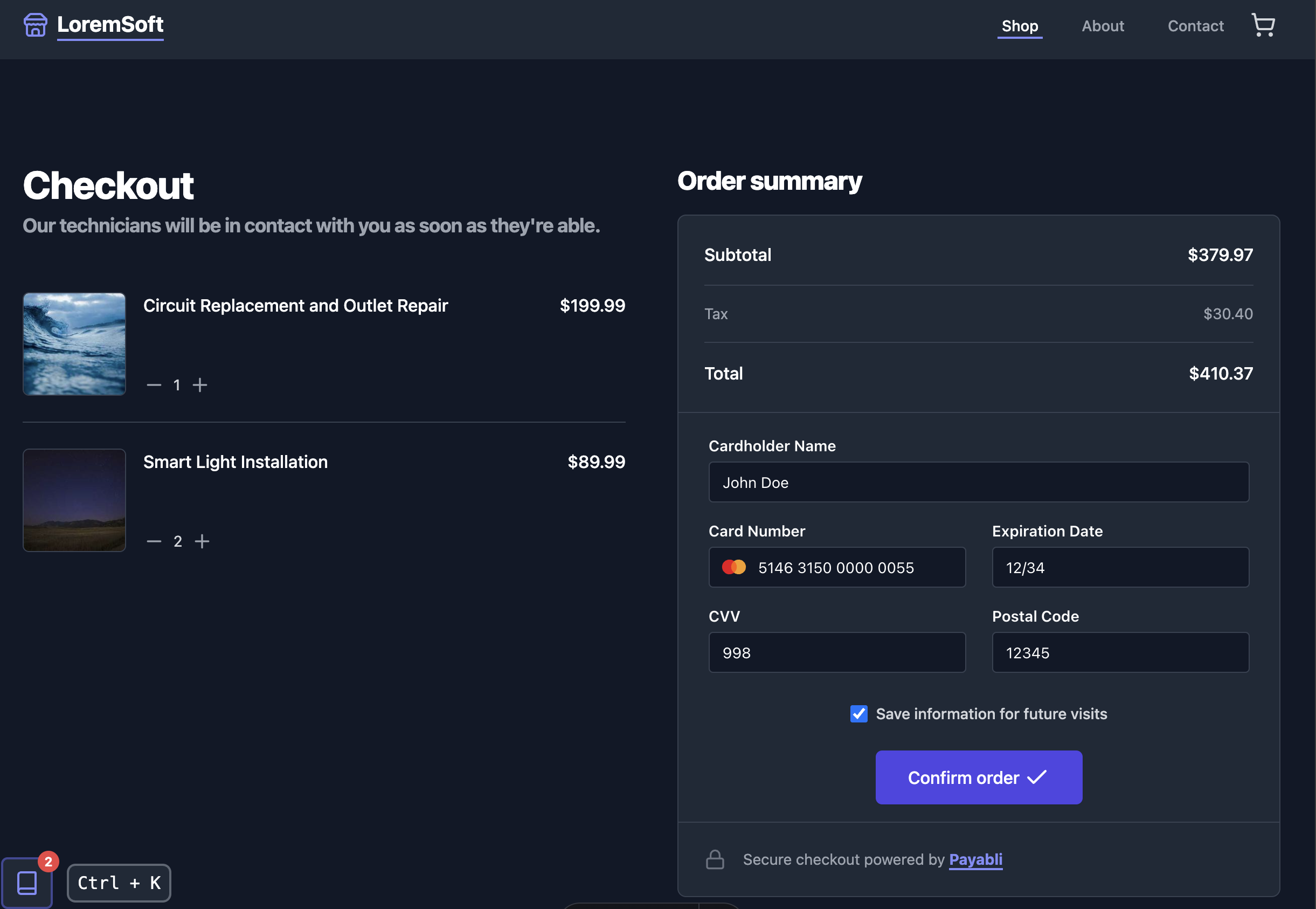
## Example app
This section covers setting up a demo app that uses the [EmbeddedMethod UI](/guides/pay-in-components-embeddedmethod-ui) and custom API calls to drive the [temporary token flow](/developers/platform-developer-tokenization-temp-flow).
The demo app walks the user through a checkout experience with an interactive guide that updates while the transaction processes.
Visit the [repository](https://github.com/payabli/examples/tree/main/temp-token) to see the code.
### Dependencies
Before you begin, make sure you have the following installed on your machine:
* [npm](https://nodejs.org/en/download/)
* [git](https://git-scm.com/book/en/v2/Getting-Started-Installing-Git)
### Set up the app
Run these commands in your terminal to configure the demo app on your local machine:
```bash
git clone https://github.com/payabli/examples
```
```bash
cd examples/temp-token
```
```bash
npm install
```
```bash
cp .env.template .env
```
Open the `.env` file in your code editor. Set `PAYABLI_API_TOKEN` to your Payabli API token and `PAYABLI_API_PAYPOINT` to your Payabli API paypoint:
```txt
# your Payabli API token
PAYABLI_API_TOKEN="123...XYZ"
# your Payabli API paypoint
PAYABLI_API_PAYPOINT="123...XYZ"
```
```bash
npm run dev
```
### Use the app
The app is a single-page application with a sidebar that contains an interactive guide.
When you click the "Confirm order" button to complete the checkout, the state of the transaction will update the sidebar guide.
Inside of the guide, there are example code snippets that you can copy and paste to help you get started using the temporary token flow in your own applications.
The app has two ways to toggle the sidebar:
* Click the button on the bottom-left (desktop) or bottom-right (mobile) of the screen with a book icon.
* Press the `Ctrl + K` key combination on your keyboard (desktop only).
## Related resources
See these related resources to help you get the most out of Payabli.
* **[Tokenization and saved payment methods overview](/guides/platform-tokenization-overview)** - Use tokenization to store and reuse payment methods securely
* **[Temporary token example app](/guides/platform-tokenization-temp-token-app)** - Go through a guided checkout experience using the temporary token flow
* **[EmbeddedMethod UI](/guides/pay-in-components-embeddedmethod-ui)** - Learn how to use the EmbeddedMethod UI embedded component to add the ability to securely store a payment profile or execute a sale
* **[PayMethod UI](/guides/pay-in-components-paymethod-ui)** - Learn how to use the PayMethod UI embedded component to securely store a payment profile with a low-code modal-based UI.