# Entities overview
> Understand Payabli's entity hierarchy including organizations, suborganizations, paypoints, customers, and vendors. Learn how entities relate and structure your payment operations in PartnerHub and PayHub
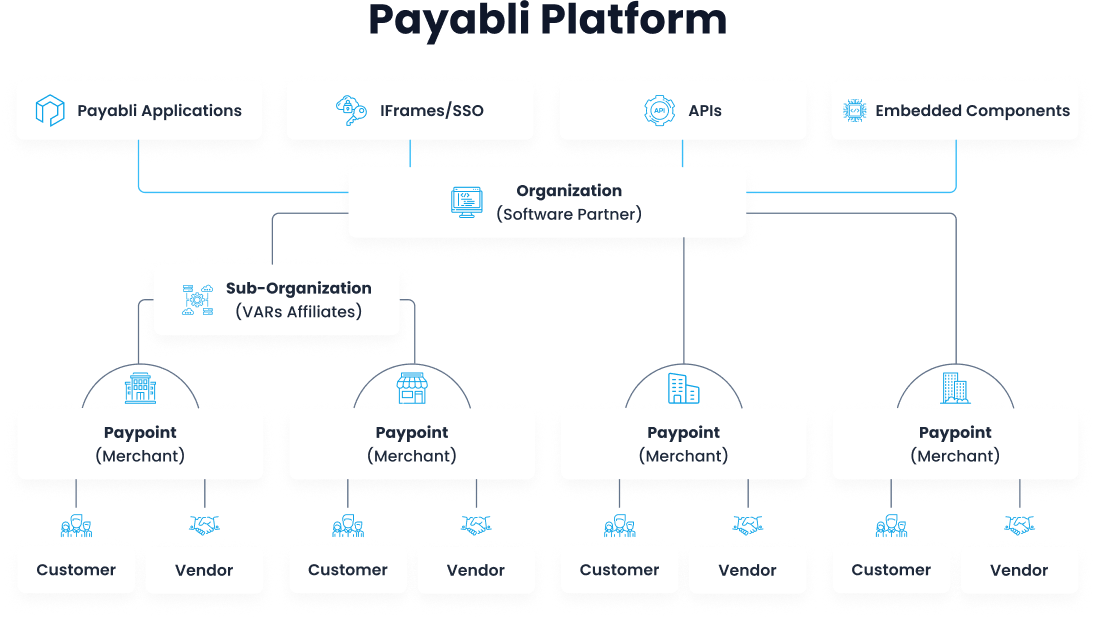
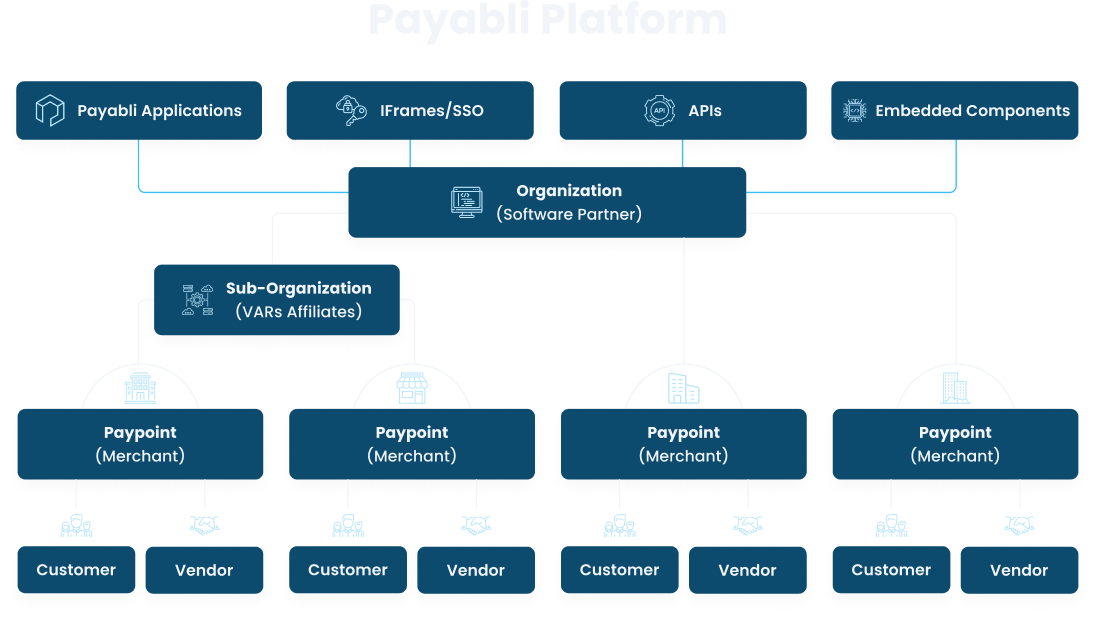
Payabli's hierarchical structure enables partners to manage unlimited suborganizations and paypoints. Below are descriptions of different entities supported within Payabli's Platform Architecture:
 ## Entity types
**Organization**: Payabli was created for organizations like software companies to manage their payments business. Organizations are able to create unlimited parent-child relationships of suborganizations and Paypoints. Organizations can white label Payabli's web app, called either PartnerHub or PayHub depending on the use, for some or all payment solutions. Organizations are sometimes referred to as "partners" in Payabli.
**Suborganization**: Suborganizations are created by organizations to group and manage paypoints. For example, if you have franchise groups, value added resellers, or trade association partners, you can create suborganizations empower those groups to manage their own paypoint portfolios.
**Paypoint**: Paypoints are the organization's customers, that are using your product to receive and send payments. These are also referred to as merchants.
**Customer**: Customers are the businesses or individuals that make payments (pay in transactions) to the paypoint via the organization's product.
**Vendor**: Vendors are the inverse of customers. They're businesses or individuals that receive payments (pay out transactions) from the paypoint.
## Entity status codes (API)
When working with entities via the API, you can control and monitor entity statuses with their status fields.
### Paypoint status
See [Paypoint status](/guides/pay-ops-paypoint-status-reference) for more information on paypoint statuses.
### Customer status
See [Customer status](/guides/pay-ops-developer-customers-manage#customer-status) for more information on customer statuses.
### Vendor status
See [Vendor status](/guides/pay-out-developer-vendors-manage#vendor-status) for more information on vendor statuses.
## Related resources
See these related resources to help you get the most out of Payabli.
* **[Manage Customers with the API](/guides/pay-ops-developer-customers-manage)** - Learn how to add and manage customers with the Payabli API
* **[Manage Users](/guides/pay-ops-developer-users-manage)** - Learn how to add and manage users in Payabli
* **[Manage vendors with the API](/guides/pay-out-developer-vendors-manage)** - Learn how to add and manage vendors with the Payabli API
* **[Manage organizations](/guides/pay-ops-portal-organizations-manage)** - Learn how to manage organizations in the Payabli UI
* **[Manage paypoints](/guides/pay-ops-portal-paypoints-manage)** - Learn how to manage paypoints in the Payabli UI
* **[Manage your profile](/guides/platform-portal-user-profile-manage)** - Learn how to manage your user profile in the Payabli UI
## Entity types
**Organization**: Payabli was created for organizations like software companies to manage their payments business. Organizations are able to create unlimited parent-child relationships of suborganizations and Paypoints. Organizations can white label Payabli's web app, called either PartnerHub or PayHub depending on the use, for some or all payment solutions. Organizations are sometimes referred to as "partners" in Payabli.
**Suborganization**: Suborganizations are created by organizations to group and manage paypoints. For example, if you have franchise groups, value added resellers, or trade association partners, you can create suborganizations empower those groups to manage their own paypoint portfolios.
**Paypoint**: Paypoints are the organization's customers, that are using your product to receive and send payments. These are also referred to as merchants.
**Customer**: Customers are the businesses or individuals that make payments (pay in transactions) to the paypoint via the organization's product.
**Vendor**: Vendors are the inverse of customers. They're businesses or individuals that receive payments (pay out transactions) from the paypoint.
## Entity status codes (API)
When working with entities via the API, you can control and monitor entity statuses with their status fields.
### Paypoint status
See [Paypoint status](/guides/pay-ops-paypoint-status-reference) for more information on paypoint statuses.
### Customer status
See [Customer status](/guides/pay-ops-developer-customers-manage#customer-status) for more information on customer statuses.
### Vendor status
See [Vendor status](/guides/pay-out-developer-vendors-manage#vendor-status) for more information on vendor statuses.
## Related resources
See these related resources to help you get the most out of Payabli.
* **[Manage Customers with the API](/guides/pay-ops-developer-customers-manage)** - Learn how to add and manage customers with the Payabli API
* **[Manage Users](/guides/pay-ops-developer-users-manage)** - Learn how to add and manage users in Payabli
* **[Manage vendors with the API](/guides/pay-out-developer-vendors-manage)** - Learn how to add and manage vendors with the Payabli API
* **[Manage organizations](/guides/pay-ops-portal-organizations-manage)** - Learn how to manage organizations in the Payabli UI
* **[Manage paypoints](/guides/pay-ops-portal-paypoints-manage)** - Learn how to manage paypoints in the Payabli UI
* **[Manage your profile](/guides/platform-portal-user-profile-manage)** - Learn how to manage your user profile in the Payabli UI