> This is Payabli documentation. For a complete page index, fetch https://docs.payabli.com/llms.txt — append .md to any page URL for lightweight markdown. For section-level indexes, query parameters, and other AI-optimized access methods, see https://docs.payabli.com/ai-agents.md
# Use Amigo Chat to generate insights and analytics
> Learn how to open Amigo, ask questions, and revisit past conversations in the Payabli Portal
You can open Amigo Chat from any page in the Payabli Portal to ask Amigo™, Payabli's AI agent, questions about your payments data, without leaving the page you're on.
Click the **Amigo** icon in the top-right corner of the Portal, next to the organization/paypoint selector and the help icon. This opens the panel to the **Chat** tab, next to a **Recommendations** tab. Click the **expand** icon in the panel to make the chat fill the screen, useful for reading a large chart or table at full size.
Amigo is available depending on your organization's settings and your role's access level, not just whether the Amigo button appears in the Portal. Amigo requires organization-level scope. It doesn't support paypoint-scoped access, though your role's scope may be narrower than your whole organization. See [Amigo boundaries and guardrails](/guides/platform-amigo-boundaries-overview) for the full access model.
## Ask a question
Amigo opens with three starter questions. Click one to ask it directly, or type your own question in plain language.
| Try asking | What it surfaces |
| ------------------------------------------------------- | ------------------------------------------------- |
| `How does my transaction volume compare to last month?` | A month-over-month volume comparison |
| `What is my top performing paypoint?` | Your best-performing paypoint by volume |
| `Are there any risk events I should review?` | Recent chargebacks, disputes, or other risk flags |
Amigo can also handle more complex, multi-part questions, like combining several data points into one request or asking for a specific chart type.
### Example: Project next month's Pay In volume
To generate a projection of transaction volume for Pay In, you can ask:
> Project my overall Pay In volume for this month, taking into consideration growth in customers and subscription volume. Project low, medium, and high models, use my current month-to-date as a floor, and display as a bar chart. Include any relevant details to help me plan for the month ahead.
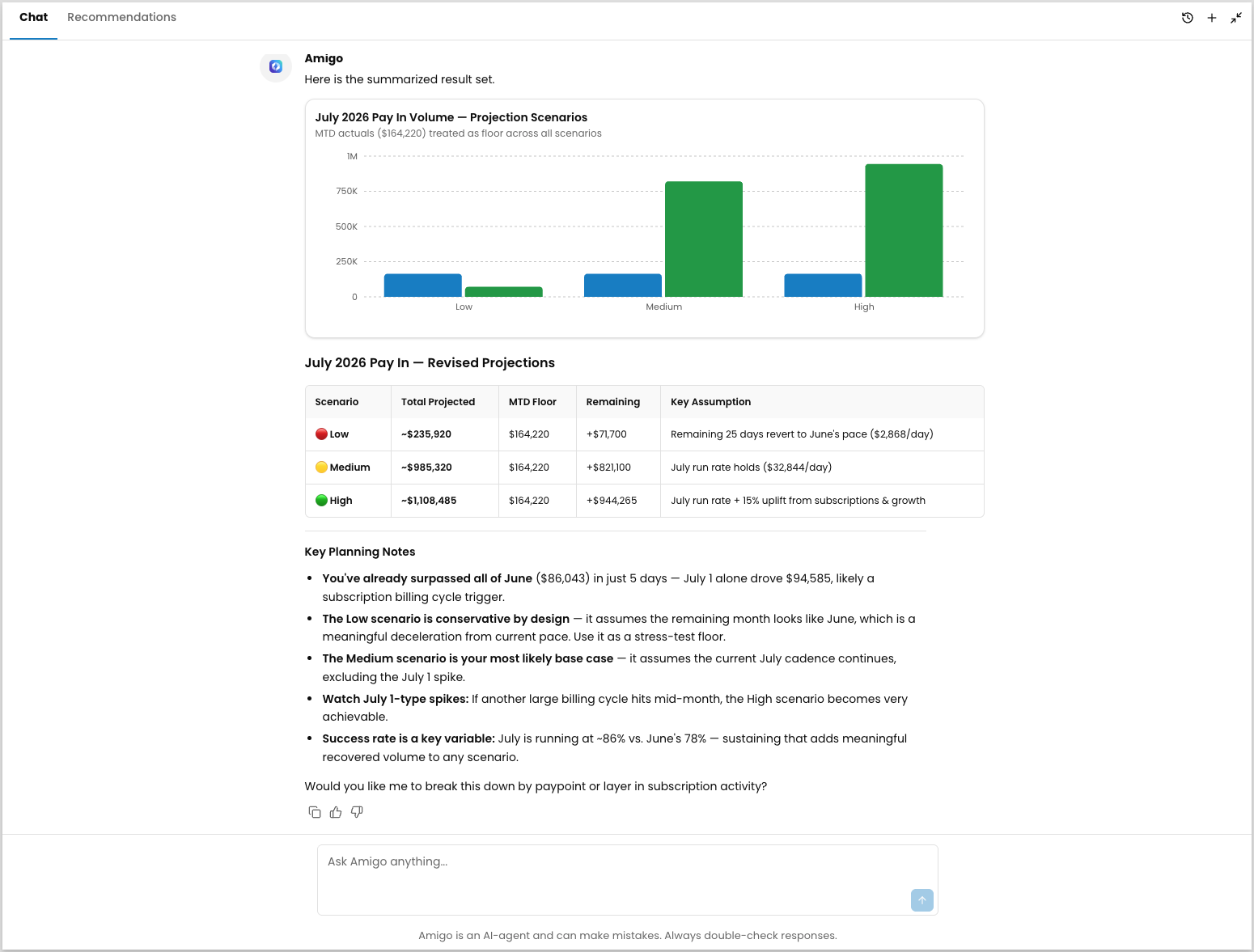 Amigo treats month-to-date actual values as a floor for every scenario. Each scenario shows two grouped bars: your month-to-date actual values, which stay constant, and the additional volume Amigo projects for the rest of the month. Since the actual-values bar never shrinks, no scenario can fall below what's already happened. Hover over a scenario to see the exact breakdown.
Being more specific in your prompts for Amigo can help produce the charts and comparisons that you'd like to see. Amigo will ask clarifying questions when things are ambiguous, or help you dive further into your data.
Amigo treats month-to-date actual values as a floor for every scenario. Each scenario shows two grouped bars: your month-to-date actual values, which stay constant, and the additional volume Amigo projects for the rest of the month. Since the actual-values bar never shrinks, no scenario can fall below what's already happened. Hover over a scenario to see the exact breakdown.
Being more specific in your prompts for Amigo can help produce the charts and comparisons that you'd like to see. Amigo will ask clarifying questions when things are ambiguous, or help you dive further into your data.
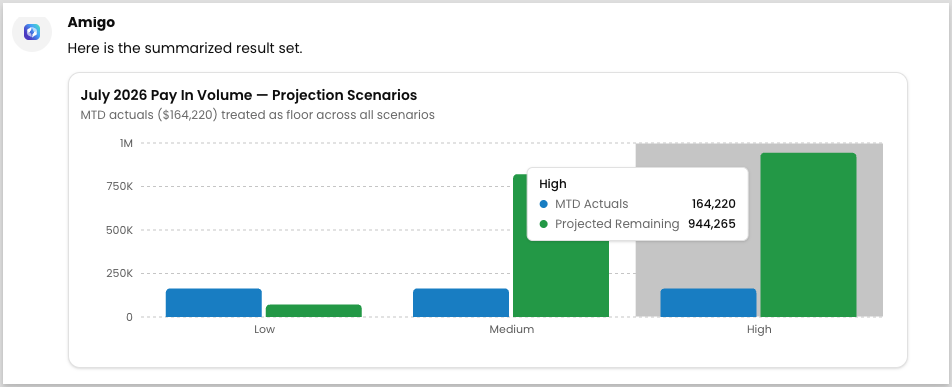 Amigo closes with a natural follow-up question, like offering to break the projection down by paypoint. Reply in the same conversation to continue refining the answer instead of starting a new one.
## Manage your conversation history
### Revisit an earlier conversation
Amigo keeps a record of your past conversations so you don't lose context between sessions. Click the **history** icon (a clock with an arrow) in the Amigo panel, then select a conversation to reopen it.
### Start a new conversation
Starting a new conversation doesn't discard the earlier one — Amigo keeps it in history so you can return to it later. Click the **plus** icon in the Amigo panel to start a new conversation.
## Related resources
See these related resources to help you get the most out of Payabli.
* **[Amigo Chat overview](/guides/platform-amigo-overview)** - Understand what Amigo is and how it answers questions before opening it
- **[Amigo boundaries and guardrails](/guides/platform-amigo-boundaries-overview)** - Understand what Amigo can access, what it won't do, and the controls partners have over it
Amigo closes with a natural follow-up question, like offering to break the projection down by paypoint. Reply in the same conversation to continue refining the answer instead of starting a new one.
## Manage your conversation history
### Revisit an earlier conversation
Amigo keeps a record of your past conversations so you don't lose context between sessions. Click the **history** icon (a clock with an arrow) in the Amigo panel, then select a conversation to reopen it.
### Start a new conversation
Starting a new conversation doesn't discard the earlier one — Amigo keeps it in history so you can return to it later. Click the **plus** icon in the Amigo panel to start a new conversation.
## Related resources
See these related resources to help you get the most out of Payabli.
* **[Amigo Chat overview](/guides/platform-amigo-overview)** - Understand what Amigo is and how it answers questions before opening it
- **[Amigo boundaries and guardrails](/guides/platform-amigo-boundaries-overview)** - Understand what Amigo can access, what it won't do, and the controls partners have over it