

Entities overview
Understand how entities like organizations, sub-organizations, paypoints, customers, and vendors work in Payabli
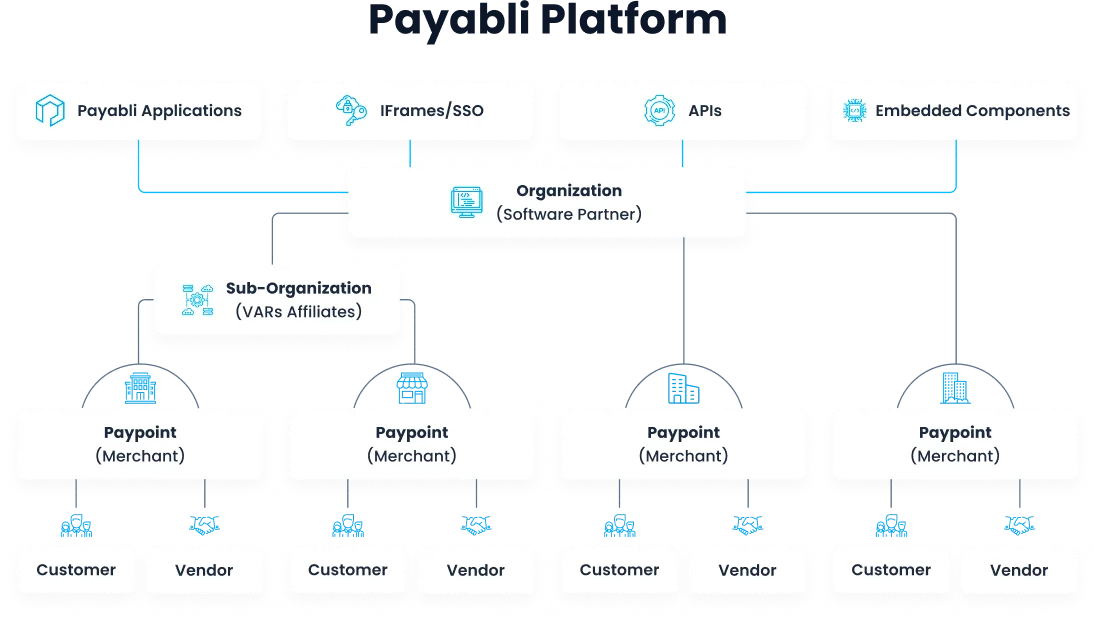
Payabli’s hierarchical structure enables partners to manage unlimited sub-organizations and paypoints. Below are descriptions of different entities supported within Payabli’s Platform Architecture:
Entity types
Organization: Payabli was created for organizations like software companies to manage their payments business. Organizations are able to create unlimited parent-child relationships of sub-organizations and paypoints. Organizations can white label the Payabli Portal, for some or all payment solutions. Organizations are sometimes referred to as “partners” in Payabli.
Sub-organization: Sub-organizations are created by organizations to group and manage paypoints. For example, if you have franchise groups, value added resellers, or trade association partners, you can create sub-organizations to empower those groups to manage their own paypoint portfolios.
Paypoint: Paypoints are the organization’s customers using your product to receive and send payments — also called merchants. A paypoint can have any combination of Pay In, Pay Out, and Pay Ops features enabled at the same time.
Customers, vendors, and stored payment methods are common across all products on the same paypoint. You don’t provision separate paypoints per product. A paypoint’s record is created through Boarding, once a merchant’s application passes underwriting review and approval. Underwriting then governs its core business details.
Customer: Customers are the businesses or individuals that make payments (pay in transactions) to the paypoint via the organization’s product.
Vendor: Vendors are the inverse of customers. They’re businesses or individuals that receive payments (pay out transactions) from the paypoint.
Access points
When you access the Payabli Portal, you can view it from one of two kinds of access point. This maps to the entity hierarchy:
- Organization level — your access is scoped across your whole portfolio: data in reports comes from every paypoint your organization manages. Use it to review paypoints, compare activity, and monitor status.
- Paypoint level — your access is scoped to a single merchant. The view shows only that paypoint’s activity, and new records you create default to it. For example, a new invoice, vendor, or customer is filled in for that paypoint.
To learn more about accessing the portal, see Access the Payabli Portal.
Your user role can differ between scopes, shaping which actions you can take. Accessing the portal for a paypoint limits data and actions to that paypoint. Moving from the organization level into a single paypoint is called going to a paypoint: it shifts your access point to that merchant’s context.
Entity status codes (API)
When working with entities via the API, you can control and monitor entity statuses with their status fields.
Paypoint status
See Paypoint status for more information on paypoint statuses.
Customer status
See Customer status for more information on customer statuses.
Vendor status
See Vendor status for more information on vendor statuses.
Related resources
See these related resources to help you get the most out of Payabli.