

Manage organizations (Portal)
Admins can build out their organization hierarchy by adding sub-organizations and keeping their details current in the Payabli Portal. Organizations group collections of paypoints and other organizations. For a full explanation of how organizations work and what to consider when structuring them, see Organizations overview.
Organization structure is difficult to change — you can’t move where an organization sits in your hierarchy through the Payabli Portal. Plan your structure before creating organizations.
Add an organization
You can add a sub-organization under your current organization from the Organizations report.
- Navigate to Portfolio > Organizations.
- Click Add Organization.
- Complete the required fields:
- Organization Name
- Email Address
- Organization Address
- Click Save.
Edit a sub-organization
You can edit a sub-organization’s details from its record page or directly from the Organizations report. To open the record page, navigate to Portfolio > Organizations and click the organization name.
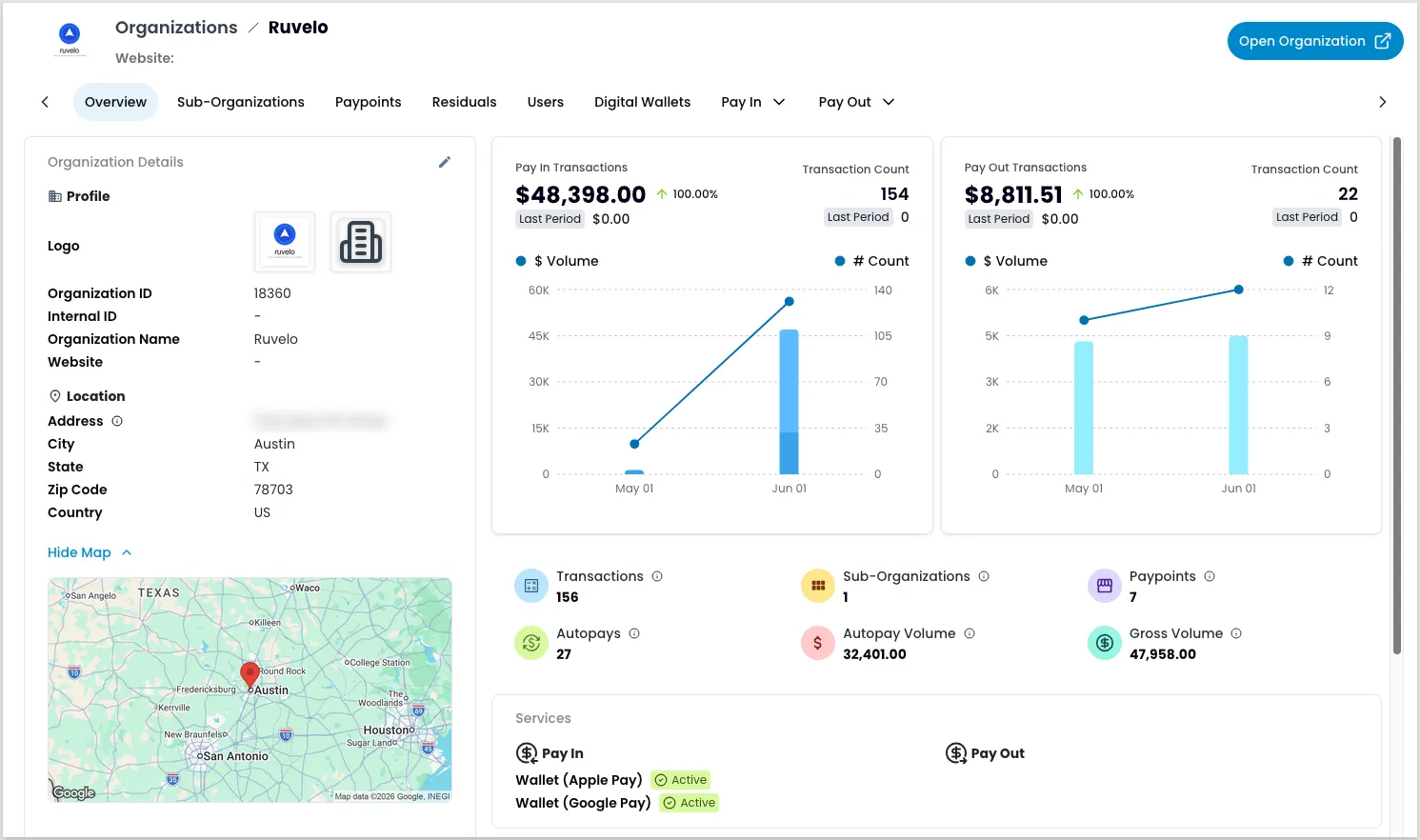
From the report:
- Navigate to Portfolio > Organizations.
- Locate the organization you want to edit and click the three-dot icon.
- Select Edit Organization.
- Update the organization information and billing details.
- Click Save to confirm your changes.
From the organization record:
- Navigate to Portfolio > Organizations and click the organization name.
- Click the edit icon beside Organization Details.
- Update the details and click Save.
View a sub-organization
Opening a sub-organization’s details doesn’t change your access context — your sidebar stays scoped to the organization you have logged in at. Use this view to check on a sub-organization’s reports without switching into it. This can be helpful when you’re managing several sub-organizations and don’t want to reselect your context for each one.
To view a summary of a sub-organization:
- Navigate to Portfolio > Organizations.
- Locate the organization you want to view and click the three-dot icon.
- Select View Details.
This view lets you review the sub-organization’s reports through various tabs:
- Overview — Check the sub-organization’s details and performance at a glance.
- Sub-Organizations — Browse the sub-organization’s own child organizations. See Explore organizations and paypoints.
- Paypoints — Browse the paypoints under this sub-organization. See Manage paypoints.
- Residuals — Review residuals earned from the sub-organization’s payments.
- Users — Review the users with access to this sub-organization. See Manage users.
- Digital Wallets — Review the sub-organization’s digital wallet activity.
- Pay In — Open the sub-organization’s Pay In reports, like transactions, autopays, and transfers.
- Pay Out — Open the sub-organization’s Pay Out reports, like transactions, bills, and vendors.
Edit organization settings
If you’re an administrator operating at the organization level, you can edit your current organization in Settings > Organization Details. Click the edit icon to update your organization’s details (icons, logos, business address, email addresses, or websites).
Related resources
See these related resources to help you get the most out of Payabli.
Prerequisites
- Organizations overview - Understand how organizations structure hierarchy, access, and configuration before managing them