

Manage custom fields for customers
Payabli’s default customer profile captures standard fields like name, address, and contact details. Custom fields let you extend that profile with data specific to your business — for example, an account tier, an internal reference number, or a contract type.
Any custom field you create can also be a custom identifier, letting you decide which customer profile fields Payabli uses to uniquely identify and associate customer records and payments.
To create, edit, or delete custom fields, you need the Admin user role. Other user roles can view but not edit the Custom Fields & Identifiers page.
Add a custom field
To add a custom field:
- Navigate to Settings > Custom Fields.
- Click Add or Edit Custom Field.
- Enter the field’s name.
- Click Save.
If you already have custom fields, click the + icon to add another.
Edit a custom field
To edit a custom field:
- Navigate to Settings > Custom Fields.
- Click Add or Edit Custom Field.
- Select the custom field you want to rename, then enter the new name.
- Click Save.
Delete a custom field
To delete a custom field:
- Navigate to Settings > Custom Fields.
- Click Add or Edit Custom Field.
- Click the trash icon beside the field you want to delete.
- Click Save.
If you accidentally delete a field, click Cancel — your changes won’t be saved.
Custom identifiers
Payabli recommends using the system-generated customerId field to identify customers for ease of integration and consistency. However, you can configure custom identifiers, which lets you decide which customer profile fields to use to uniquely identify and associate customer records and payments.
Custom identifiers cascade from org parent to child entities, so you can set them at the organization level and have them apply to all child paypoints. This is useful if you want to use a specific field across all your customers, such as email or clientId.
For example, if your company uses the customer’s email address as their unique identifier, you can choose email as the identifier. If your organization prefers to identify customers by a field called clientId, you can create that custom field in Payabli and set it as an identifier. This means that every API call that involves a customer must include the clientId because Payabli uses that field to search for customers.

To configure custom identifiers:
- Navigate to Settings > Custom Fields.
- Click Edit in the Custom Identifiers section.
- Select the fields you want to use as identifiers.
- Click Save.
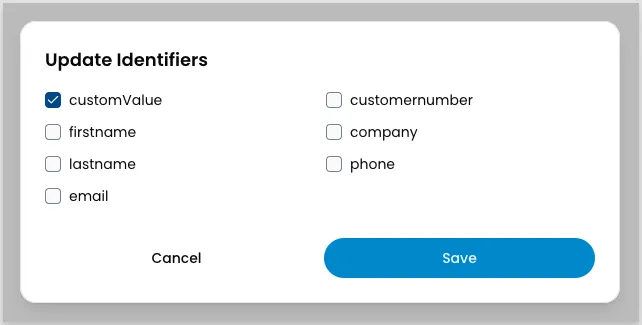
Custom identifiers set at the organization level cascade to child paypoints, where they appear checked and grayed out for merchant users. Paypoint-level users can’t change a grayed-out field — this is intentional, because changing identifiers can break their integrated software. If a merchant needs different identifiers, coordinate the change with them instead of having them edit these settings directly.
Related resources
See these related resources to help you get the most out of Payabli.